Code adjustment corrects inventory for items with the same characteristics and cost price — for example, items registered under different codes that need to be unified, transfer inventory from one code to another, etc.
When to use
It is used when the items that go out of stock and those that come in have the same cost price. The adjustment is done at cost — the quantity and total value at the end must be zero.
Create Document
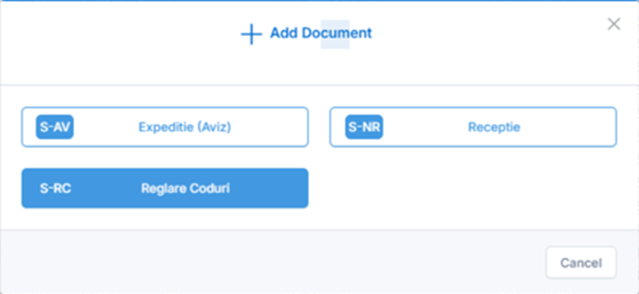
From the Stocks – Movements menu, click Add and select S-RC Adjust Codes.
Fill in the header:
- Warehouse — your own warehouse is automatically selected.
- Date — the current date.
- Reference/Remarks — optional, if applicable.
Articles
Click Add Row to insert the items:
- Items that go out of stock are introduced with a negative quantity (minus).
- Items that go into stock (those that replace them) are introduced with a positive quantity (plus).
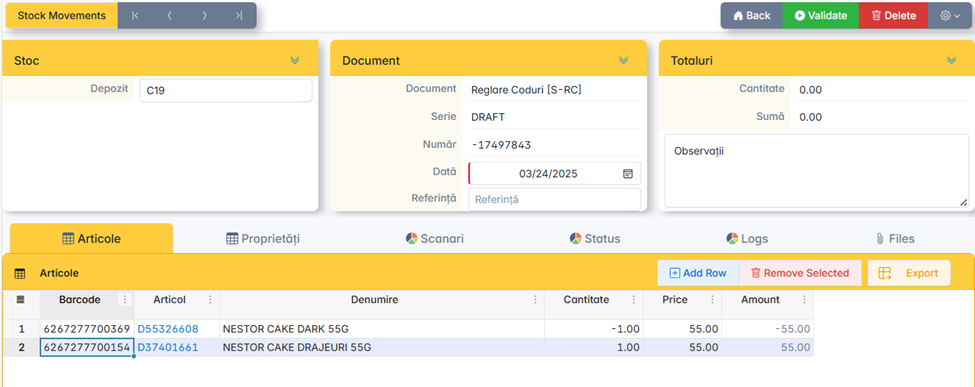
Check the Totals field—the quantity and total value must be zero before posting.
Validation
Click Validate to issue the document.