Internal procurement records the inflows of goods from local suppliers.
Document Date
From the Stocks – Purchases menu, click Add.

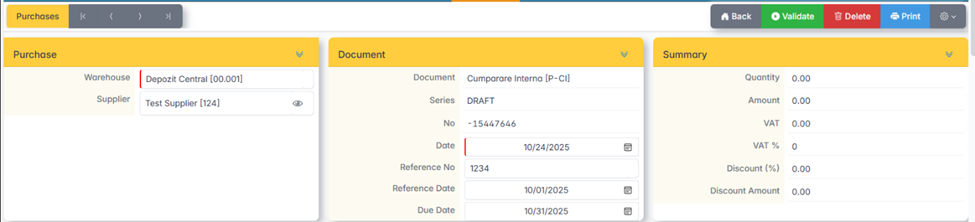
Fill in the header of the document:
- Warehouse — the warehouse where the goods are received.
- Supplier — the supplier of the goods. If it does not appear in the list, it is added from Stocks – Suppliers.
- Date — date of receipt.
- Reference number — the supplier's invoice number.
- Reference date — invoice date.
- Due date — the due date of the invoice.
Articles
Click Add Row to insert the items.

Items can also be added via Copy/Paste from an XLS file — copy the item code or barcode, quantity and price.
To delete an item, select and click Delete Row.
Validation and printing
- Press Back to save the document without issuing it.
- Click Validate to issue the document.
- Press Print to print the Receipt Entry Note.
Before validation, check the summary of the document — quantitative and value.