The classification organizes items into multiple axes — for filtering, reporting, pricing and discount policies.
The purpose of the Classification is managerial, to segment the items.
For example, a color classification should include only the main colors, if we include shades or combinations, the classification loses its usefulness.
Elements of classification
The usual classifications are:
- Category — top group (Clothing, Shoes, Accessories).
- Subcategory — secondary level (Shoes, Boots, Sandals).
- Brand — the brand or manufacturer.
- Supplier — who delivers the item.
- Gender — for gender-differentiated items.
- Size — numeric or S/M/L.
- Season — the seasonal collection.
Additional elements can be configured depending on the activity of the company.
To check/complete the classification, select Classification from the Items menu.
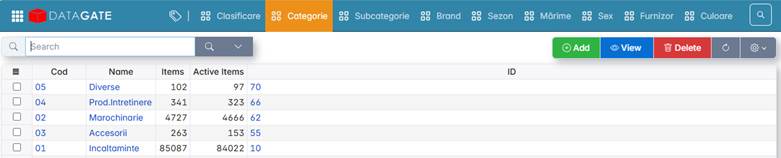
To add new classification elements, press the Add key and fill in Code and Name.

Coding rules
Each element is defined with code and name.
The classification code can be included in the automatically generated item code — e.g. 2 characters per item, resulting in a short and consistent code.