Create an invoice
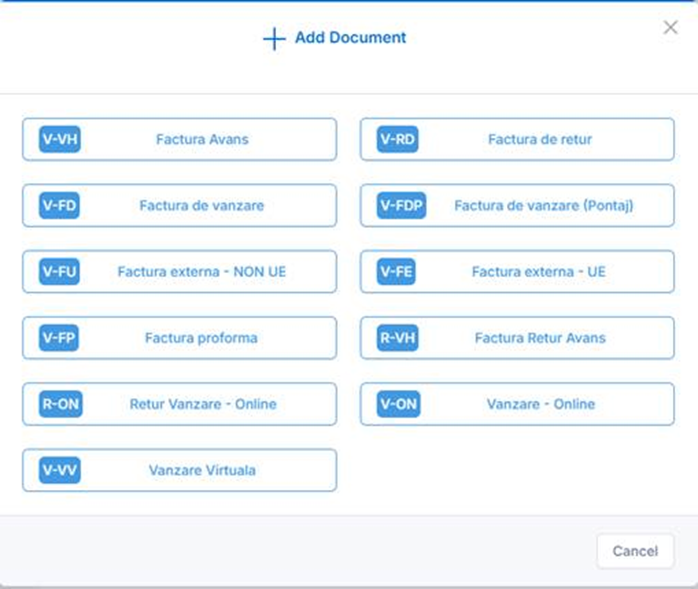
- From the Sales menu, click Add and select the document type (for example, V-FD – Sales Distribution Invoice).
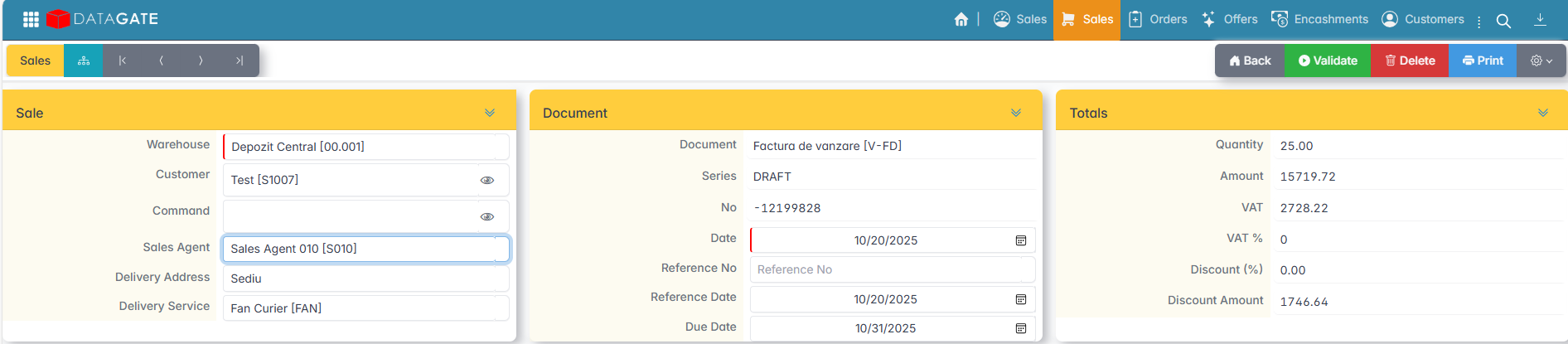
- Fill in the header of the document:
- Warehouse — the warehouse from which the goods leave.
- Customer — the business partner. Click the symbol next to the field to check your billing data.
- Order — If the invoice is linked to an order, select it from the list. Items and trading conditions are automatically retrieved.
- Salesperson — selected if applicable.
- Delivery address — may be different from the address of the registered office.
- Delivery service — the courier who will carry out the transport.
- Add items to your invoice by searching or Copy/Paste from Excel.

- Verify the data and issue the document with Validation.
- Print your invoice with Print after validation.
If the invoice is created from an existing order, the items, quantities, and prices are automatically retrieved.
The document type determines the flow in which the invoice operates (distribution, external, advance, proforma) and the specific configurations — visible fields, inventory behavior, pricing rules.