What it offers
Datagate exposes a dataset through the OData format, directly consumable in Power BI or other platforms. This allows companies using Power BI for advanced analytics to connect Datagate as a data source, with no manual export, no intermediate files.
Available dates
The OData dataset includes:
- Master data — items, warehouses, classifications
- Transactional data — sales, purchases, orders, stock transactions, inventories
- Current stocks — real-time stock situation at each location
- Pre-calculated aggregate reports—Monthly and yearly summaries, ready to use in dashboards, optimized for rapid consumption in Power BI
Overall architecture
The framework allows the exposure of any SQL View as an OData v4 endpoint. The data can be precomputed by a stored procedure.
OData mode and Basic authentication are not enabled by default. It is necessary to activate the module in the settings and restart the service.
A developer defines:
[optional] Stored Procedure ──▶ SQL View ──▶ TKODataReports (config)
PowerBI / client OData
        │
        ▼
GET /odata/r/$metadata          ← schema CSDL generată dinamic
GET /odata/r/{EntitySetName}    ← date din view, cu $filter/$top/$skip/$count
Steps to add a new report
Step 1 — Create the SQL View
The view is created in the database.
Mandatory requirements:
- Column
ID(or other single column) — for the OData key
Requirements for PowerBI Incremental Refresh:
- A date column (e.g.
DocumentDate date) — for filtering by time ranges - A last modified column (e.g.
LastChanged datetime2) — for detecting changes
Minimum example:
CREATE OR ALTER VIEW [dbo].[vDXMyReport]
AS
SELECT
    s.ID,
    CAST(s.DocumentDate AS date)      AS DocumentDate,   -- ← DateColumn
    s.CompanyID,
    c.CompanyName,
    SUM(si.AmountWithVAT)             AS TotalVanzari,
    MAX(s.DocumentLastChangedDate)    AS LastChanged     -- ← ChangedColumn
FROM [TRSales] s
JOIN [DBCompany] c  ON c.ID = s.CompanyID
JOIN [TRSalesItems] si ON si.SaleID = s.ID
WHERE s.DocumentStatus = 1
GROUP BY
    CAST(s.DocumentDate AS date),
    s.CompanyID,
    c.CompanyName;
Step 2 — [Optional] Create Stored Procedure Calculation
If the view is based on pre-aggregated data (table ST*), the procedure populates that table.
CREATE OR ALTER PROCEDURE [dbo].[MyReportRebuild]
AS
BEGIN
    SET NOCOUNT ON;
    -- logică de calcul / upsert în tabelul de staging
    -- ex: MERGE INTO STMyReport USING (...) AS src ON ...
END
The procedure will be called by Hangfire on the interval configured in the datagate.
Step 3 — Register the report in the UI
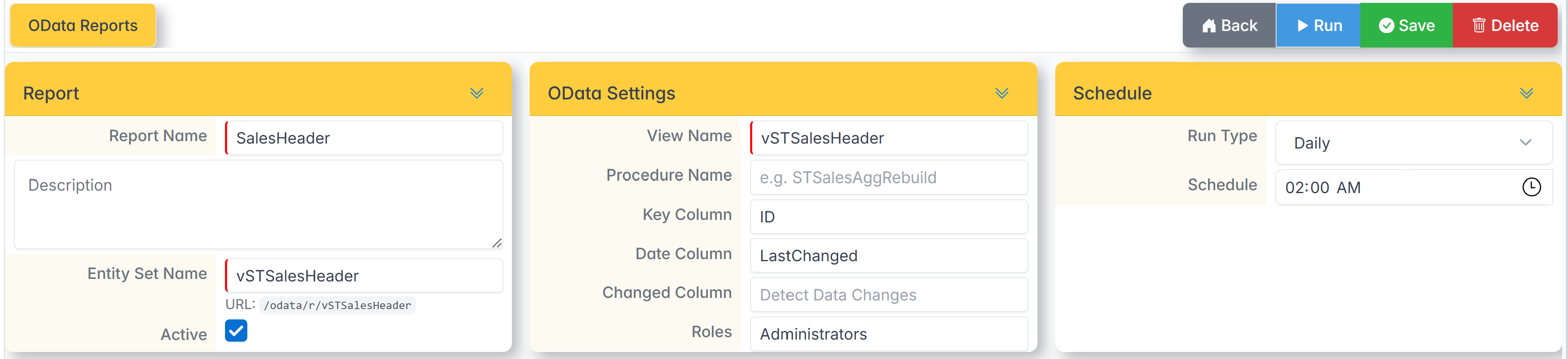
| Field | Required | Description |
|---|---|---|
| Report Name | YES | Name displayed in the UI |
| Entity Set Name | YES | Entity name in OData URL: /odata/r/{EntitySetName}. No spaces, no diacritics, unique. |
| View Name | YES | The exact name of the SQL view (e.g. vSTSalesAgg) |
| Procedure Name | No | Stored calculation procedure (e.g. STSalesAggRebuild). If it is missing, no Hangfire job is created. |
| Key Column | No | The primary key column (default: the first column in the view). Used in $metadata. |
| Date Column | No | The date column for PowerBI Incremental Refresh (e.g. DocumentDate). |
| Changed Column | No | Change column for Detect Data Changes (e.g. LastChanged). |
| Roles | No | Comma-separated roles that can access the OData endpoint (e.g. Administrators,PowerBI). If blank → anyone logged in. |
| Run Type | YES | OnRequest / AtInterval/ Daily/ Weekday / / MonthDay |
| Assets | YES | If disabled, the report disappears from OData and the Hangfire job is stopped. |
After saving: The OData schema automatically rebuilds. The /odata/r/{EntitySetName} endpoint becomes active immediately.
Available OData endpoints
| URL | Description |
|---|---|
GET /odata/r/ |
Service document — list of all entities |
GET /odata/r/$metadata |
XML CSDL schema — read by PowerBI on login |
GET /odata/r/{EntitySet} |
Data in view |
GET /odata/r/{EntitySet}/$count |
Number of records |
POST /odata/r/$reload |
Force rebuild the schema |
OData Parameters Supported
| Parameter | Behavior |
|---|---|
$top=N |
Maximum N rows (default and maximum: 50 000) |
$skip=N |
Pagination — skips over N rows |
$count=true |
Include @odata.count in reply |
$select=col1,col2 |
Returns only the specified columns |
$filter=... |
Filter on date column (for Incremental Refresh — see §5) |
Login
Access without PowerBI (direct browsing)
The /odata/r/{EntitySet} endpoint requires authentication ().[Authorize] The customer must send:
- Session cookie — the user is logged in to the app, or
- Bearer JWT —
Authorization: Bearer <token>
Role Constraint (Roles field)
If the Roles field is filled in (e.g.), PowerBI,Administratorsthe user must be in at least one of the specified roles. If it is empty — any authenticated user can access it.
Access from PowerBI
The PowerBI OData connector supports Basic or OAuth authentication. Recommended configuration for on-premise:
- Create a dedicated account (e.g.
powerbi_reader) in the app - Assign the role specified in the Roles field (e.g.
PowerBI) - In PowerBI Desktop: Get Data → OData feed → URL:
http://server/odata/r/
→ Authentication: Basic → Username/Password
Configuring PowerBI — Incremental Refresh
Requirements on view
The view MUST have a column of type date or datetime2 that PowerBI can filter.
PowerBI automatically sends shape filters:
GET /odata/r/SalesAgg?$filter=DocumentDate ge 2024-01-01T00:00:00Z and DocumentDate lt 2024-02-01T00:00:00Z
The server translates this to SQL:
WHERE [DocumentDate] >= '2024-01-01 00:00:00' AND [DocumentDate] < '2024-02-01 00:00:00'
Setup in PowerBI Desktop
- Get Data → OData feed → URL:
http://server/odata/r/ - Select the entity (e.g.
SalesAgg) - In Power Query Editor, parameterize the date columns:
RangeStart = #datetime(2020, 1, 1, 0, 0, 0) RangeEnd = DateTime.LocalNow() - Add filter on the column configured as the Data Column:
Table.SelectRows(Source, each [DocumentDate] >= RangeStart and [DocumentDate] < RangeEnd) - Home → Incremental Refresh → enables → configures the data window
Detect Data Changes (optional)
If the Changed Column is filled in (e.g.: LastChanged):
- PowerBI checks if the column's MAX value has changed since the last synchronization
- If it doesn't — the partition doesn't reprocess → faster synchronization
SQL → OData Type Mapping
| SQL Server | OData / PowerBI |
|---|---|
int |
Edm.Int32 |
bigint |
Edm.Int64 |
smallint |
Edm.Int16 |
tinyint |
Edm.Byte |
bit |
Edm.Boolean |
numeric, decimal |
Edm.Decimal |
float |
Edm.Double |
real |
Edm.Single |
date |
Edm.Date |
datetime, datetime2, datetimeoffset |
Edm.DateTimeOffset |
uniqueidentifier |
Edm.Guid |
time |
Edm.TimeOfDay |
| everything else | Edm.String |
Observations and limitations
| Aspect ratio | Detail |
|---|---|
| Default TOP | Maximum 50 000 rows per request. Pagination with $skip. |
| $filter supported | Only on the column configured as Data Column (Incremental Refresh). Other complex filters are not supported (the framework does not parse OData $filter generics). |
| $orderby | It is not supported — the order of the rows is not guaranteed. |
| $expand / Navigation | Not supported — views are flat (no relationships) entities. |
| Performance | Direct views (without staging table) can be slow on full historical data. Recommended Incremental Refresh with max 1 year window + 7 day rolling window. |
| Recommended indexes | TRSales(DocumentDate), TRSales(DocumentLastChangedDate), TRSalesItems(SaleID) |
Full example — new report from scratch
1. SQL View
CREATE OR ALTER VIEW [dbo].[vSTSalesPaymentSummary]
AS
SELECT
    ROW_NUMBER() OVER (ORDER BY CAST(s.DocumentDate AS date), s.CompanyID, pm.PaymentType) AS ID,
    CAST(s.DocumentDate AS date)    AS DocumentDate,
    s.CompanyID,
    c.CompanyCode,
    c.CompanyName,
    pm.PaymentType,
    pm.PaymentMethod,
    COUNT(DISTINCT s.ID)            AS NrDocumente,
    SUM(sp.Amount)                  AS TotalPlata,
    MAX(s.DocumentLastChangedDate)  AS LastChanged
FROM [TRSales]          s
JOIN [DBCompany]        c   ON c.ID  = s.CompanyID
JOIN [TRSalesPayments]  sp  ON sp.SaleID = s.ID
JOIN [SETPayments]      pm  ON pm.ID = sp.PaymentMethodID
WHERE s.DocumentStatus = 1
GROUP BY
    CAST(s.DocumentDate AS date),
    s.CompanyID,
    c.CompanyCode,
    c.CompanyName,
    pm.PaymentType,
    pm.PaymentMethod;
2. Configuration in UI (/dataexchange/odatareports → Add)
Report Name:       Sales Payment Summary
Entity Set Name:   SalesPaymentSummary
View Name:         vSTSalesPaymentSummary
Procedure Name:    (gol)
Key Column:        ID
Date Column:       DocumentDate
Changed Column:    LastChanged
Roles:             (gol)
Run Type:          OnRequest
Active:            ✓
3. Test endpoint
GET http://server/odata/r/$metadata
GET http://server/odata/r/SalesPaymentSummary?$top=100
GET http://server/odata/r/SalesPaymentSummary?$filter=DocumentDate ge 2024-01-01T00:00:00Z
4. PowerBI Login
- Get Data → OData feed →
http://server/odata/r/ - Select
SalesPaymentSummary - Set up Incremental Refresh on the column
DocumentDate