Scenario: Online order shipping
This example walks through the complete integration flow for an online order shipment, from order creation to inventory document retrieval.
1. Create Scan Order
The external system (eCommerce platform, ERP) sends the order to Datagate:
POST /DataExchange/TR/Orders/Create
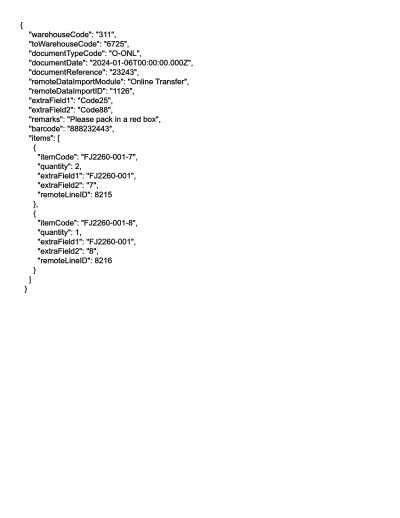
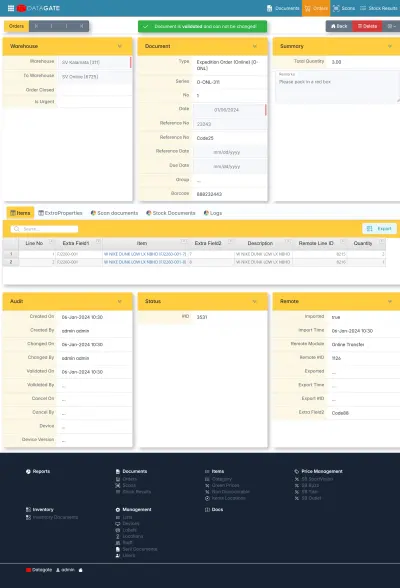
Order data explained with examples
sample of data sent:
| Field | Contents | JSON |
|---|---|---|
| Process | Document Type: Order Shipping (Online) | "documentTypeCode": "O-ONL" |
| Document identity | Reference in the source system | "remoteDataImportID": "WEB-12345" |
| Source Repository | Shipping warehouse code | "warehouseCode": "DEP-01" |
| Articles | List of products with quantities | "items": [...] |
2. Scan on your device
After syncing, the command appears on the scanner in the warehouse. The operator selects it, scans the items (guided or classic) and closes the order.
Upon closing, ICS automatically generates the corresponding stock document (S-ONL for online shipping).
3. Stock Document Retrieval
The external system takes over the generated document:
GET /DataExchange/TR/Stocks/GetExport?InterfaceName=Online&ExportType=StockExport&IncludeNotExported=trueThe stock document contains the items actually scanned (which may differ from the order in the case of receipts), with the actual quantities.
4. Mark as exported
After successful retrieval:
POST /DataExchange/TR/Stocks/SetExported?DocumentSeries=S-ONL&DocumentNo=42&InterfaceName=Online&ExportType=StockExport5. Get Document by Metadata ID
If the external system stored its own ID at creation (remoteDataImportID), it can identify the stock document by this ID, correlating the sent order with the scan result.