What is it
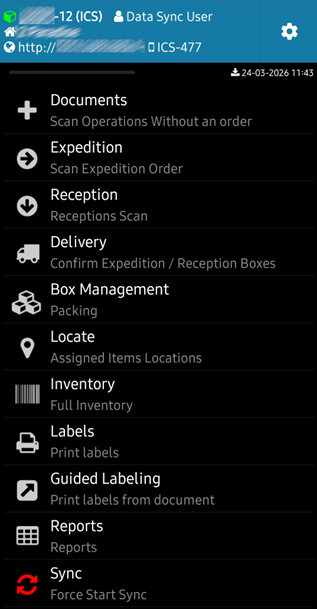
ICS handles all scanning operations in the store and warehouse. It is the application that operators with mobile scanners (Zebra terminals or similar) use to process goods: shipments, receptions, inventories, labeling, transport and WMS operations.
ICS is built on the Datagate platform and works in conjunction with the other modules — orders come from Business Essentials, scanned goods update stock in real-time, differences are automatically reported.
Operations Covered
Shipments — scanning shipments based on a pre-order or free (no order).
Receipts — scanning the receipt based on an input document (supplier invoice, notice from another store).
Free scanning — documents initiated directly from the scanner: storefront scanning, orderless shipping, defect inventory, other custom flows.
Inventory — full or partial inventory with sections, verification, and validation.
Baxare — creating boxes/boxes and using them in scans. Includes Box Reception for fast reception based on reliable boxes.
Reports — check prices, inventory, or items, with data from the server or offline.
Label printing — labeling products with Bluetooth mobile printer.
Guided labelling — labelling on the basis of a price change order.
Transport — issuance of AWB, UIT, confirmation of shipment and receipt of boxes.
Item location — Assign fixed locations on items with directions in scan commands.
Inventory by location — WMS operations: Bringing in and removing items from the location.
Email notifications — items to be labeled (price changes), differences at reception, orders to be shipped with pictures of the items.
Working methods
Guided scanning — for documents with order (shipments, receipts with document). The program guides the operator through the list of items, showing what needs to be scanned, in what order and in what quantity. When shipping, you cannot scan items or quantities different from the order.
Free scanning — for documents without an initial order: shipment from scanner, inventory, generic scan, customer delivery scan, supplier receipt scan, customer return scan. The operator scans what is in front of him, without any control restrictions.
Order Closing
There are two ways to close an order:
On the scanner — if only one person processes the order on a single scanner, the order closes automatically when the scan is complete.
On the server — if the same order is scanned with multiple scanners in parallel (e.g. two operators working on the same large shipment), the order must be manually closed from the server. The option must be set in advance on the scanner.
Closing the order automatically generates the inventory document, invoice, or other required documents.