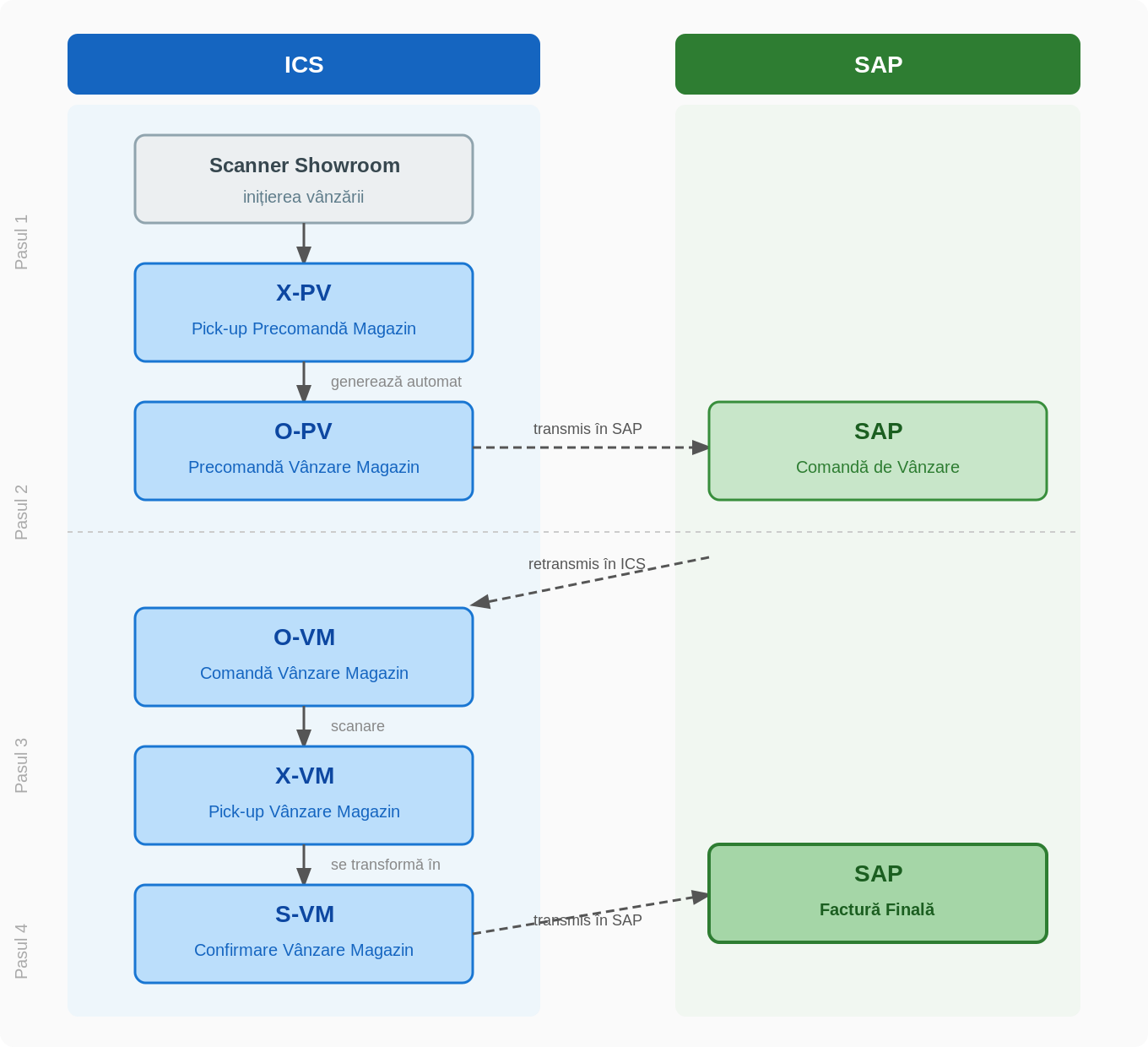
The showroom sales flow starts from the scanner and ends with the generation of the invoice in SAP, going through four stages with specific documents in ICS and SAP.
Flow stages
Step 1 — Create Scan Order (ICS)
The order is created in ICS via the scanner. Type of document generated on scanning: X-PV (Store Pre-Order Pick-up). When issuing the X-PV document, the system automatically generates the O-PV document (Store Sale Pre-Order).
Step 2 — Transmission and processing in SAP
The O-PV document is transmitted from ICS to SAP, where it is taken over as a sales order. After the processing is complete, the document is retransmitted to Datagate under the type O-VM (Store Sale Order).
Step 3 — Confirmation and Inventory Document Generation (ICS)
The O-VM document is scanned in Datagate, generating the X-VM (Pick-up Shop Sale). The X-VM document turns into the final stock document: S-VM (Store Sales Confirmation).
Step 4 — Final Invoice Generation (SAP)
The S-VM document is transmitted from ICS to SAP. In SAP, the final invoice for the sale is generated .