The procedure is used to cancel a tax receipt issued on the same day. Common reasons: operating error (the cashier issued the receipt by mistake) or the customer has changed his mind and no longer wants the products.
Please note: the cancellation operation can only be done on the same day the document was issued.
1. Search for tax receipt
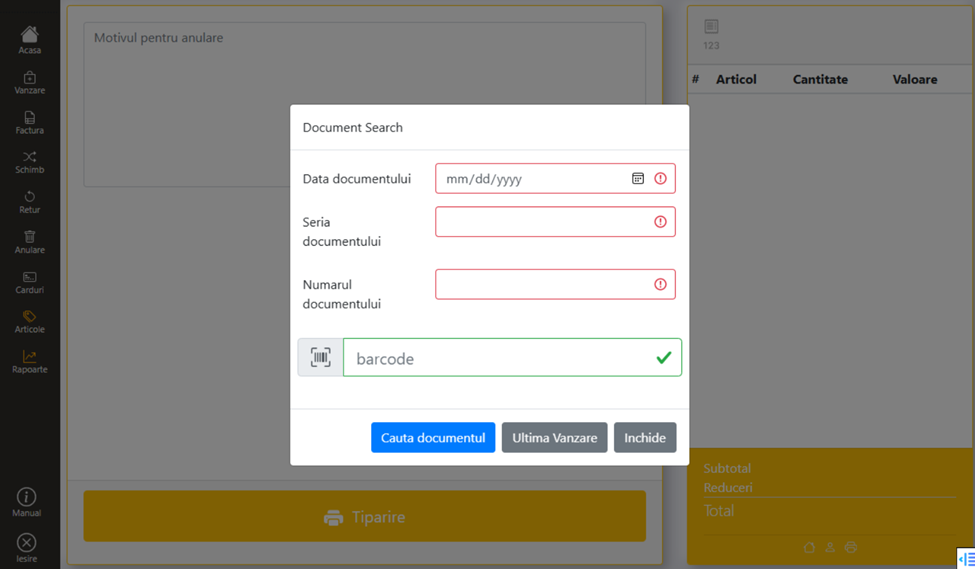
From the main menu, press the Cancel key. The search window opens:
- Introduction date, series, document number
- Barcode scanning on the receipt (auto-fill)
- Last Sale — for canceling the last transaction
2. Completion of the reason for cancellation
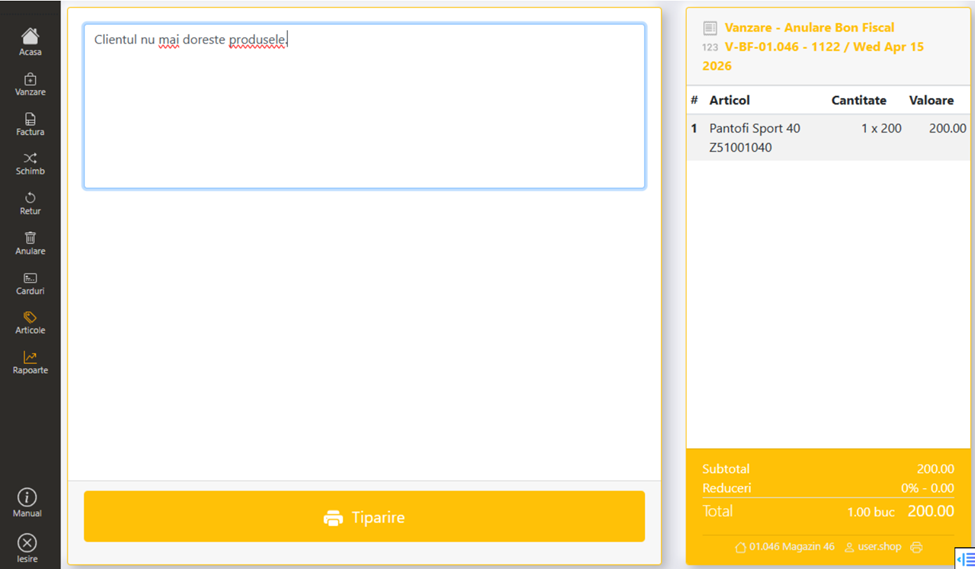
If the document was found, the date of the original sale is displayed in the window on the right. It is mandatory to fill in the reason for cancellation in the designated space (operating error, the customer no longer wants the products, etc.).
3. Printing
Press the Print key. A Notification is printed and completed and signed by the cashier.
Reprinting of the complaint
The cancellation notification can be reprinted from the Reports → View Transactions. Select the Cancel transaction and click Print from the right window.