What it covers
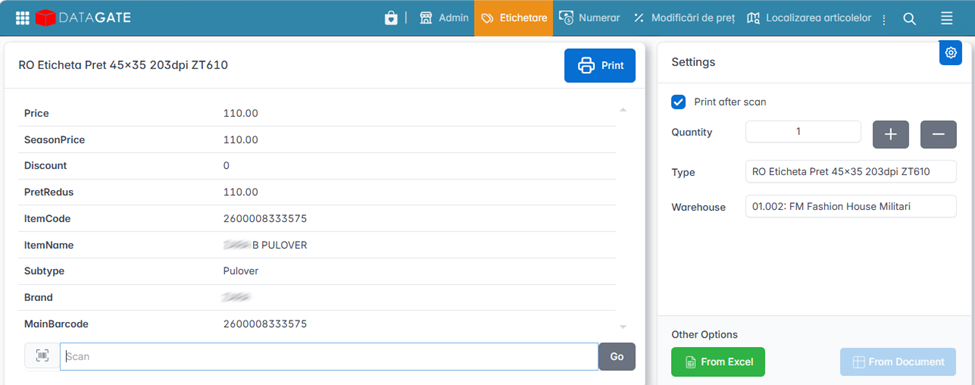
The labeling module generates the price tags for the shelf and for the product. The labels automatically reflect the current price, the initial price, the discount and other relevant information (barcode, name, unit of measurement).
Labeling is directly linked to price management: at a price change, the system automatically identifies items that require new labels and prepares them for printing.
Types of labels used in retail and logistics
1. Item Labels (SKU/Product)
- They contain basic information: product name, SKU code, EAN/UPC code, price.
- Used for shelving, warehouse, picking, inventory.
- They usually include a barcode.
2. Price Labels
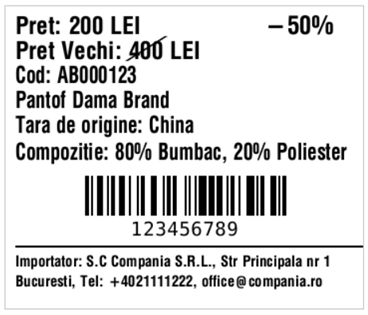
- Displays the current price and the old price.
- Price at 30 days.
- Price per Unit of Measure for liquid items.
- Larger price size than the rest of the text to be visible.
- Especially used for price changes, promotions or daily updates.
3. Discount Tags / Promotions
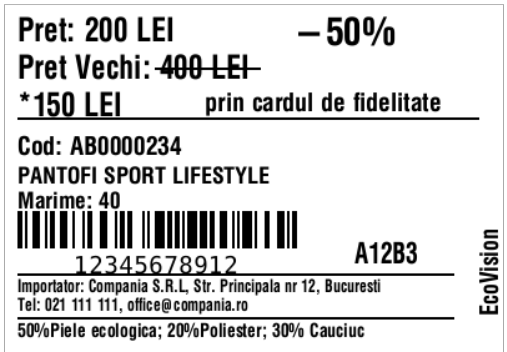
- Highlight temporary discounts: discount percentage, old price vs. new price, discount percentage.
4. Tags for loyalty card campaigns
- Displays the standard price and discounted price for card customers.
- They can include conditional text: "Card price", "Member price".
5. Composition labels (textile, food)
- They contain mandatory information: materials, washing instructions, ingredients, allergens, batch, date of production.
- They are usually longer labels, with a lot of text, possibly with graphic symbols.
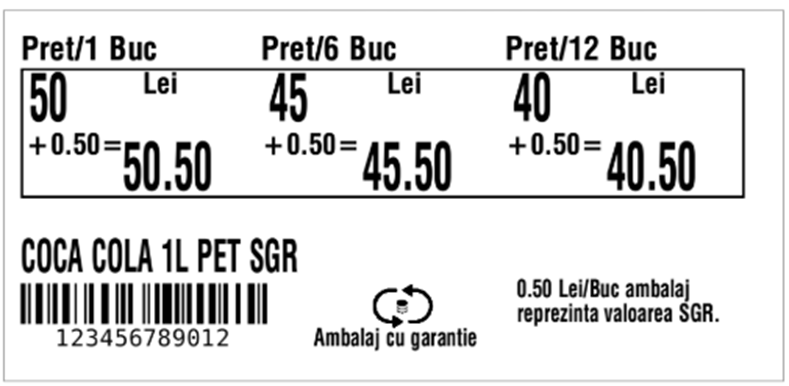
6. Multi-price tags
- Used for products with variants (e.g.: 1 pc., 2 pcs., multipack).
- They can include two or more prices on the same layout.
7. SGR (Guarantee-Return System) Labels
- They contain the SGR symbol and the value of the guarantee
- Requires space for the SGR logo and mandatory text.
- They are usually integrated into the main price or product label.
Common formats and sizes
The size of the label depends on the type of product, shelf, printer and amount of information.
Common Sizes
- 40×25 mm – small, simple labels, contain little information: article code, price, barcode.
- 50×40 mm – standard labels for retail.
- 70×50 mm – labels with more information (promotions, loyalty).
- 100×50 mm – labels for warehouse, logistics, boxes.
- 100×150 mm – AWB, transport labels, palletizing.
Technical considerations
- The labels are adapted to the printer's resolution (200 dpi vs. 300 dpi).
- Small fonts (<8 pt) are more readable at 300 dpi.
- Barcodes must be sized correctly for scanning (especially EAN13).
Workflow
1. Data Generation
- The data comes from Datagate.
- The layout is defined in ZPL (Zebra Programming Language).
2. Sending the order to the printer
- Via USB, network, Bluetooth.
- The app generates the ZPL and sends it directly to the printer.
Supported Printers
1. Mobile Zebra printers – example: ZQ620
- Portable, Bluetooth/Wi-Fi.
- Used for small and medium labels (shelf, inventory, pricing).
- Typical resolution: 203 dpi.
- Consumables: small rolls, direct thermal paper.
2. Industrial Zebra printers – example: ZT410
- Stationary, robust, for large volumes.
- Available in 203 dpi and 300 dpi variants.
- Supports wide labels, large rolls, ribbons (heat transfer).
- Recommended for complex labels with a lot of text.
3. Supported resolutions
- 200 dpi (203 dpi actual)
- Ideal for standard barcodes and medium text.
- 300 dpi
- Best for labels with a lot of text, composition, textile symbols.
4. ZPL Language
- Zebra's standard for generating labels.
- Advantages:
- Precise positioning control.
- Compatibility with most Zebra printers.
- Allows: text, barcodes, graphics, images, lines.