To add the sales prices for the stores, access the Items - Import Prices menu.
In this menu, the sale price and the discount based on item code or barcode are imported.

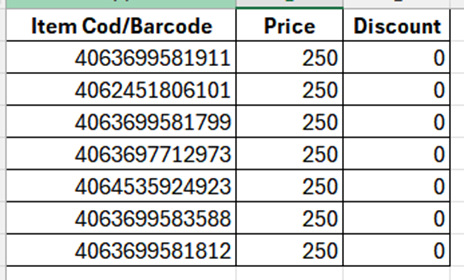
- Items can be added to the window manually or (copy/paste) from an xls file containing a list consisting of item code and price. If you wish, you can enter the sale price and the discount at the same time.
To apply the price, from the settings menu, select Apply Prices.

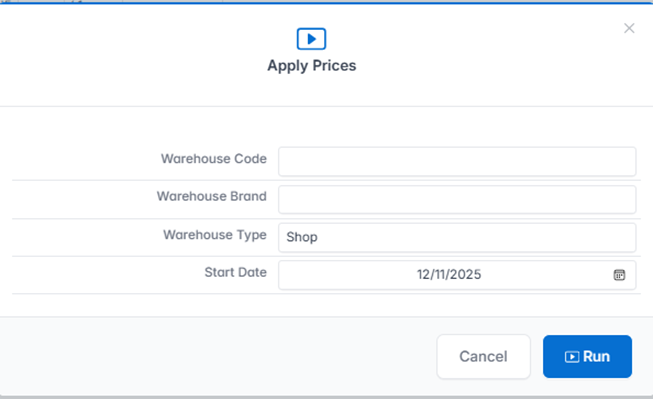
The next window will open where the store(s) where the price will be applied is selected.
- Warehouse code - if the price is applied only on one store, the store code on which the price is applied is selected.
- Store Brand - if price is applied only to one brand, select Store Brand.
- Warehouse type - if the price is applied on all stores, select Shop.
- Date - select the date from which the price will come into effect.
The Run key is pressed.
Note: The classification of Warehouses/Stores is done with the creation of stores in the application.
2. In the settings menu we also have the following options for entering prices and discounts on stores:
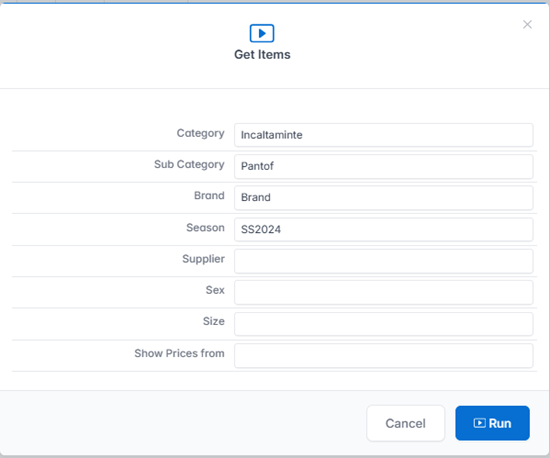
- Item Selection - Get Items. It is used to select items according to classification.
Select the desired characteristics from the filter according to the classification.
To see the current price, select the management from which the price will be displayed - Show Prices from.
The Run key is pressed.
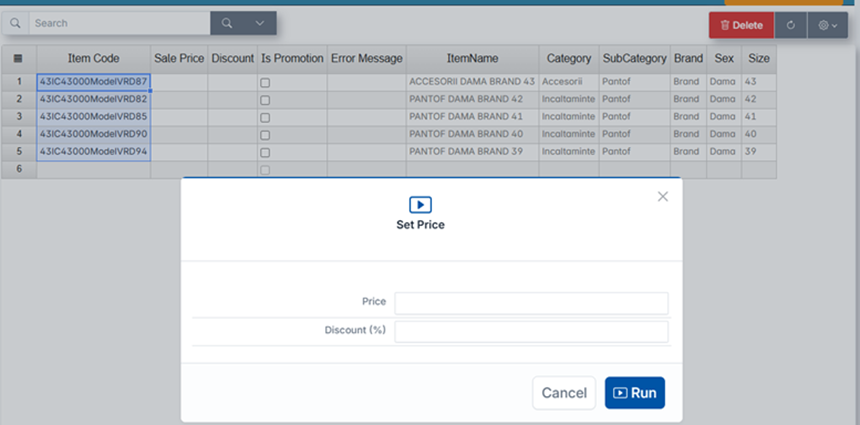
- Introduction of unique prices/discounts - Set Prices. Sis used to enter unique prices/discounts on selected items.
In the Item Code field, enter Item Code or Barcode (or select items according to classification - Get Items) and select Set Prices from the Settings menu. The next window will open where you enter the price or discount and press the Run key.
Both information (price and discount) can be entered at the same time.
To apply the price, press the Apply Prices button.
- Clear All – all information added to the page will be deleted. Price changes are not saved.